
Rectify product · v1.2.0
Rectify Jabre
Rectify Jabre is a Windows desktop travel booking terminal built for agencies and internal ops teams, modeled on the same command-line workflow used by Sabre Red 360 and Amadeus Selling Platform. Search availability, sell segments, build PNRs, price itineraries, and print them to PDF, all from the keyboard.
Unsigned NSIS installer for Windows. Windows SmartScreen may warn on first run since the binary isn’t code-signed. That’s normal for a small, independently-built installer, not a sign anything is wrong.
What it is
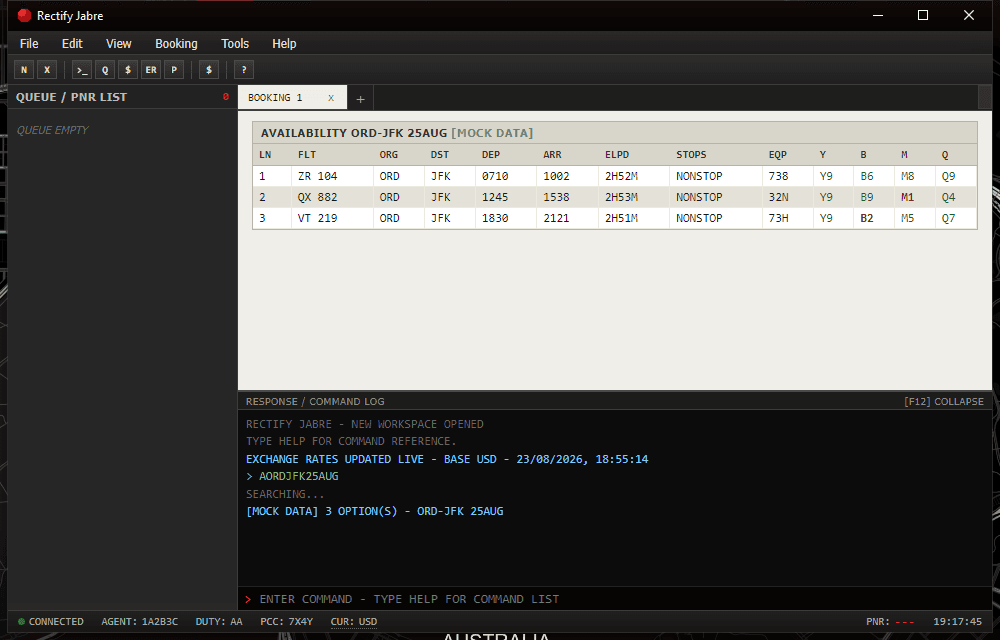
Jabre is a Windows desktop reservation terminal modeled on the command-line workflow of real GDS platforms like Sabre Red 360 and Amadeus Selling Platform. You type commands into a workspace: search availability, sell a segment, add a passenger, price the itinerary, then end the transaction to generate a record locator. It’s the same workflow a travel agent runs every day, without the GDS contract behind it.
Built for: Travel agencies, ops teams, and anyone who needs a real reservation-terminal workflow without a GDS contract.
Command set
Type commands into the entry field at the bottom of the terminal (or press F3 to focus it). All commands are case-insensitive.
| Command | Description |
|---|---|
| A<ORIG><DEST><DDMMM> | Search flight availability, e.g. AORDJFK25AUG |
| S<line>[class] | Sell a segment from the last availability display, e.g. S2 or S2M |
| NM1<LAST>/<FIRST> [TITLE] | Add a passenger name, e.g. NM1SMITH/JOHN MR |
| FXP | Price the itinerary using the last sold fare class |
| ER | End & Retrieve, saves the PNR and generates a record locator |
| IG | Ignore, discards the current workspace transaction |
| RT<LOCATOR> | Retrieve a saved PNR by its record locator |
| QR | Queue Review, lists all saved PNRs |
| QD<LOCATOR> | Queue Delete, removes a PNR from the queue |
| WP | Write/Print itinerary to PDF (PNR must be saved with ER first) |
| I / IR | Display the active PNR in the current workspace tab |
| SI | Sign off and close the terminal |
| CC<CODE> | Set the display currency to a live exchange rate, e.g. CCEUR |
| CC | List all available currency codes |
| HELP | Show the full command reference in-app |
Example booking flow
Search, sell, name, price, and finalize a booking in six lines.
Function keys
Live airline data (optional)
By default, availability searches run against a built-in synthetic schedule. It covers roughly 140 IATA airport codes worldwide, and flight time, aircraft, and fare all scale from great-circle distance, so any recognized city pair comes back with a plausible result instead of an error.
Want real carriers, real flight numbers, real fares instead? Connect one or both providers under Tools › Live Data Settings.
- SearchAPI.io (tried first). Mirrors live Google Flights results. Free tier gives you 100 requests total, no card required.
- Apify (kicks in once SearchAPI’s free requests run out, or if it’s the only one you’ve set up). A multi-source fare-scraping actor running at roughly $0.0003 per search, pay-per-use.
Results are always labeled so you know what you’re looking at: [LIVE - REAL AIRLINE DATA], [SIMULATED - NO LIVE FARE FOUND], or [MOCK DATA]. Live results get cached locally for 24 hours per route, date, and currency, which stretches your free quota a lot further. Nothing in the app ever actually books, holds, or purchases a real flight.
Currency
Fares are priced internally in USD and converted on the fly whenever you switch display currency. Click the CUR: indicator in the status bar, use Tools › Change Currency, press F11, or type CC<CODE> (say CCEUR). Every switch pulls live mid-market rates from the free Frankfurter API (European Central Bank reference rates, no key required), and those rates are cached locally so the app still works offline, marked (CACHED) when it’s using them.
Data persistence & privacy
Agent profiles, PNRs, API settings, and the 24-hour live-fare cache all live in a local JSON file inside Electron’s per-user data directory. Bookings survive closing and reopening the app, and nothing leaves your machine except the optional live-fare and currency lookups you explicitly turn on. Read the privacy policy for the full detail.
Try it
After installing, sign on with either demo profile below to poke around the terminal against the built-in synthetic dataset. No live API keys needed.
| Agent ID | Password | Duty code | PCC |
|---|---|---|---|
| 1A2B3C | jabre1 | AA or SUP | 7X4Y |
| DEMO01 | demo | AA | 9Q1Z |
Auto-update
Jabre ships with auto-update wired in from day one, same as software you’d pay for. When a new version goes out, the app checks for it and prompts you to install. No manual reinstall, no chasing down a new download link every time.